39g Wireless Gaming Mouse: 42K DPI & 8K Polling Speed
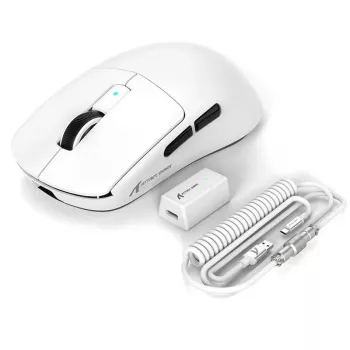
Ultra-Light 39G Wireless Gaming Mouse with 42K DPI and 8K Polling Rate
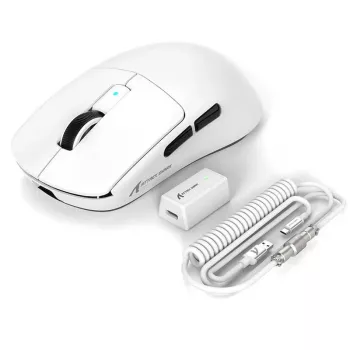
An ultra-light wireless mouse built for fast flicks, steady tracking, and low-latency clicks. With a 39 g body, up to 42,000 DPI sensitivity, and an 8,000 Hz polling option, it’s designed for competitive play where control, consistency, and responsiveness matter as much as comfort over long sessions.
What makes an ultra-light mouse feel faster
Weight changes how a mouse behaves the moment a match gets chaotic. An ultra-light design reduces inertia, which can make your hand feel more “connected” to the crosshair when you’re snapping to targets, stopping precisely, and re-centering between engagements.
- Low mass reduces the force needed to start, stop, and change direction, which can make micro-corrections easier during aim duels.
- A lighter shell can also reduce wrist and forearm fatigue during long practice blocks, especially for low-sensitivity players who swipe more.
- Balance matters as much as grams: a centered feel helps keep lifts and resets consistent on the mousepad.
That last point is easy to overlook. Two mice can share the same weight, but the one with a more neutral balance often feels more predictable when you lift, tilt, and set it back down during quick resets.
Core performance: 42K DPI and 8K polling
High-end sensor and wireless performance show up as consistency: a smooth, repeatable line when you track, and click responses that feel “on time” even during rapid direction changes.
- DPI sets cursor sensitivity; practical competitive ranges commonly sit far below the maximum, but a higher ceiling can indicate a modern sensor platform and strong tracking headroom.
- 8K polling rate increases how often the mouse reports movement to the PC (up to 8,000 times per second), which can reduce input granularity and timing variance on capable systems.
- Real-world benefit depends on the full chain: game engine, CPU load, USB stability, and display refresh rate all influence whether higher polling feels smoother.
- To avoid stutter, pair high polling with a stable USB controller path and keep background CPU spikes under control.
Polling rate is also closely tied to how USB devices communicate. If you want the standards-level overview, the USB HID documentation is a solid reference. For a broader view of end-to-end latency factors (not just mouse input), NVIDIA Reflex explains how system latency can add up across the pipeline. For performance context and how reviewers often evaluate mice, RTINGS’ mouse testing methodology is a useful baseline.
Specs at a glance
Use these numbers to compare weight and responsiveness across similarly priced wireless options. If switching from 1,000 Hz, consider testing 2,000–4,000 Hz first, then moving up if performance remains stable.
| Spec | Value | Why it matters |
|---|---|---|
| Weight | 39 g | Lower inertia for quicker starts/stops and easier micro-adjustments |
| Max sensitivity | 42,000 DPI | High headroom; typical in-game use is much lower |
| Polling rate | Up to 8,000 Hz | More frequent updates can reduce motion timing variance on capable setups |
| Connectivity | Wireless | Freedom of movement; placement and interference management matter |
| Availability | In stock | Ready to ship while stock lasts |
Wireless stability and interference tips
Wireless performance is usually excellent when the receiver has a clean path and minimal local interference. If aim feels “off” or tracking looks slightly inconsistent, the fix is often setup-related rather than sensor-related.
- Keep the receiver close to the mouse (front USB port or a short extension) to reduce packet loss in noisy environments.
- Avoid placing the receiver directly behind a PC chassis or near USB 3.0 hubs that can contribute to 2.4 GHz interference.
- If tracking feels inconsistent, test different USB ports and reduce other high-bandwidth USB devices on the same controller.
A simple rule: if your receiver is currently hidden behind the tower, bring it forward first. That single change can improve signal stability in crowded desktop setups.
Grip styles and who benefits most
Ultra-light mice tend to amplify your natural grip habits. The upside is speed and reduced fatigue; the tradeoff is that shell shape and balance become more noticeable.
Setup checklist for consistent aim
Who this mouse is a strong fit for
Product page
Ultra-Light 39G Wireless Gaming Mouse with 42K DPI and 8K Polling Rate — $79.51 (in stock).
More in-stock picks
- How to Choose Chandelier by Height and Scale Checklist | Chandelier Sizing Guide | Lighting Design Tips | Digital Download
- 12-Ton Heavy Duty Hydraulic Shop Press for Garage and Workshop
- 16 Piece Blue Stoneware Dinner Set – Elegant Floral Embossed Plates & Bowls
FAQ
Does 8K polling rate make a noticeable difference in games?
It can, but results vary by game and system. Higher polling may reduce timing variance and feel smoother on stable, high-refresh setups, but it also demands solid USB performance and enough CPU headroom—testing 2K/4K versus 8K is the most reliable way to judge.
What DPI should be used for competitive FPS?
A practical range is often 400–1600 DPI, with in-game sensitivity tuned to your preferred turning distance. Very high DPI isn’t required for strong performance; it mainly indicates sensor headroom rather than a setting you must use.
How can wireless interference be reduced for more consistent tracking?
Place the receiver closer to the mouse using a front USB port or short extension, and avoid positioning it behind a PC case or near USB 3.0 hubs. If issues persist, try different ports and reduce other high-bandwidth USB devices sharing the same controller.






Leave a comment